
Launching your business on Amazon is an exciting journey and with the right steps, you can set up your store professionally, even if you’re just getting started. In this guide I’ll walk you through everything from account setup to storefront design in clear, human-friendly language.
1. Get Your Basics in Place
a) Create a Seller Account
First things first: go to the Sell on Amazon page and register as a seller. You’ll provide:
- Your business or personal identity (depending if you’re an individual seller or a company)
- Bank/payment details
- Contact information Sell on Amazon
b) Choose Your Selling Plan
Amazon typically offers two main plans:
- Individual plan (good if you’re selling small volume)
- Professional plan (better if you plan to scale) Sell on Amazon
c) Register your brand (if you have one)
If you have a brand (or plan to build one), enrol in the Amazon Brand Registry. This gives you
extra features (and control) for your store.
2. Decide What You’re Selling
a) Market research
Before you just list any product, take time to explore:
- What’s already selling on Amazon
- What your competition looks like
- What your cost, shipping effort, and profit margin might be
b) Prepare product listings
For each product you plan to sell, you’ll want to gather:
- High-quality images (Amazon has specific guidelines)
- A clear title, description, and keywords
3. Create Your Storefront (Your Brand Home on Amazon)
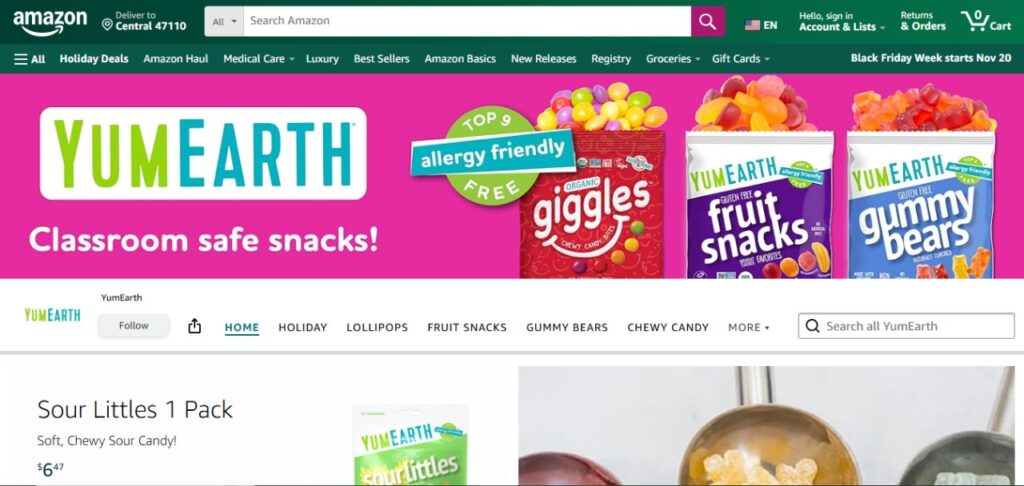
If you want to build more than just “a listing” and instead craft a brand presence, you’ll build a storefront within Amazon.
a) Why build a storefront?
- It allows you to showcase your full product range in one place
- You can design pages, use video/images, tell your brand story.
- It helps customers trust you (they see more than a single product).
b) How do you build it? (Step-by-step)
Here’s a streamlined version of the process:
- Log into your Seller Central account.
- Navigate to Stores (or “Brand Store” / “Storefront”) and click Create Store.
- Choose a template/layout for your homepage (e.g., hero image + product grid).
- Add your brand name, logo, banner/hero image. Make sure your visuals are high
quality. - Build sub-pages as needed (for different product categories) and add your products via tiles.
- Preview the store on desktop and mobile (very important). Then submit it for
publishing. - After approval, your storefront is live. Start monitoring performance via Amazon’s insights tools.
4. Optimize For Success
a) Visual & content quality
Your images and videos matter. A crisp hero image, clear product photos, and engaging visuals will make a big difference.
b) Navigation & structure
Make it easy for customers to find what they want: categorize your products logically, use
clear headings, and guide them from “look” to “buy”.
c) Use analytics
Once your store is live, use the insights Amazon provides: how many visitors, how many
viewed pages, what products convert. Then iterate: tweak images, test different layouts
d) Promote your store
It’s not enough just to set it up; you’ll want to bring traffic. Use social media, email
newsletters, maybe Amazon Ads. This helps put people onto your storefront.
5. Manage Fulfilment & Customer Experience
a) Shipping & fulfilment
Decide whether you’ll fulfill orders yourself (“Fulfilled by Merchant” or FBM) or use Amazon’s
fulfillment (“Fulfilled by Amazon” or FBA). Each has pros/cons.
b) Customer service & reviews
Respond promptly to enquiries. Encourage satisfied customers to leave reviews (within
Amazon’s rules). Good service helps you stand out.
c) Inventory & performance
Ensure your stock levels are accurate. Avoid running out or getting back-orders. Poor
inventory management can hurt your standing.

6. Launch & Grow
- Soft launch: Start with a smaller set of products to test the waters.
- Analyze data after a few weeks: which products sell, which don’t, what page layouts encourage buys.
- Refine: Based on what you learn, tweak your store design, product copy, visuals, maybe pricing.
- Scale: Add more products, optimize promotions, possibly expand to other Amazon marketplaces globally (if relevant).
- Amazon’s official guide for seller registration: How to register as an Amazon seller Sell on Amazon
- Step-by-step on building your Amazon Store: How to build an online store (Amazon) Sell on Amazon
- Beginner’s overview article: How to Build an Amazon Store: A Step-by-Step Guide uschamber.com
Setting up an Amazon store like a pro doesn’t mean you need fancy tech or thousands of products. It means:
- Starting clean, following the right steps
- Being thoughtful about your brand, visuals, user-experience
- Launching, observing, iterating
If you approach it step by step with care, you’ll give yourself a strong foundation.
And remember: every big store started somewhere. You’re standing at “somewhere” let’s
make it count.